Docs
4. Subscriptions
What is a Subscription?
A subscription links your application to a specific product. By subscribing, you agree to the terms and limits defined by that product and receive the credentials (API keys) needed to make API calls.
Each subscription is tied to:
- A product (the API bundle you want to use)
- An application (your registered app in the portal)
How Subscriptions Work
Choose a product
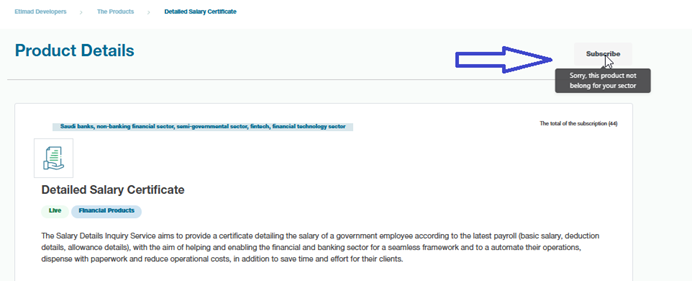
Select an API product that meets your needs from products page. Click subscribe to start subscription cycle, select rate plan and confirm your subscription.
Subscribe through the product details page
- Click Subscribe, select a rate plan, and accept the terms and conditions.
- Click Confirm in the popup to submit your subscription request.
- An admin will review your request and approve or reject it with a reason.
Note: If this product is not related to your sector, you cannot subscribe to it.
- Create a new app – Link your registered application to the product.
- Get credentials – The portal provides API keys.
- Start consuming APIs – Use those credentials in your API requests.
Managing Subscriptions
- You can subscribe to multiple products with the same app.
- Each subscription can have its own key.
- If your subscription expires or is revoked, API calls using that key will fail.
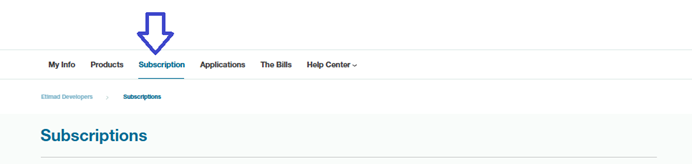
- You can access your plans by clicking Subscriptions from the main menu.
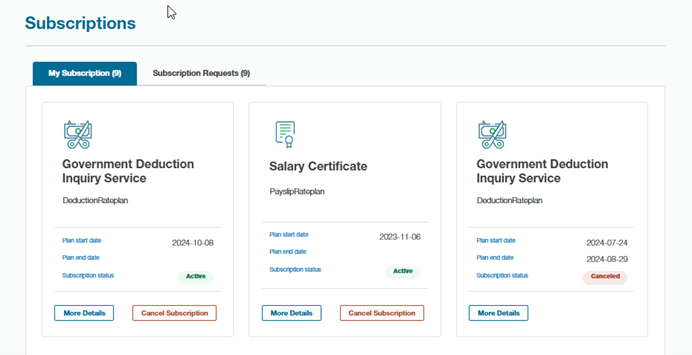
- You can cancel your subscription from the Subscriptions page by clicking Cancel Subscription.
Managing your rate plan subscriptions
Open your subscriptions page from main menu.
- View details about your subscribed plan by clicking View Details.
Cancel a subscription by clicking Cancel Subscription.
Approval Cycle
What is the Approval Cycle?
The approval cycle is the process the portal uses to validate and approve developer subscriptions. An admin reviews your request before granting access. This ensures your information is complete and valid for subscribing to the product.
How Approval Works
- Developer submits a subscription request
- Select a product.
- Subscribe to the product.
- Portal sends the request to an admin for review
- The Portal notifies the admin about the request.
- A notification is also sent to you, including the request number and details.
- Admin reviews the request
- The admin checks if the developer meets the requirements.
- The admin either approves or rejects the request.
- Developer notified
- Approved → You receive an approval email.
- Rejected → You receive a notification with the reason.
Why Approval Cycle Matters
- Protects sensitive APIs.
- Helps manage requests and resellers.
- Ensures only verified requests gain access.
- Supports compliance with business and legal requirements.