Docs
1. Introduction
Welcome to the Etimad Developer Portal.
The Developer Portal provides beneficiaries with a mechanism to obtain data and services from the national systems at the National Center for Government Resource Systems (NCGR) via an electronic link between NCGR solutions and products and the beneficiary’s systems through Application Programming Interface (API) technology, enabling access to reliable, up-to-date data from its primary source instantaneously.
Obtain national systems data on the Etimad platform by linking your system through API technology and increase your business efficiency.
What you can do here:
- Explore available APIs
- Create an account and get API keys
- Subscribe to API products and rate plans
- Test APIs directly in the portal
- Track usage and manage applications
Target Audience
Government Entity
Includes government agencies, government banks, and government funds.
The financial and banking sector
Includes local and foreign banks, financing companies, credit information institutions, insurance and reinsurance companies, and financial technology institutions (fintech), including payments, electronic wallets, and buy now, pay later.
The Private Sector
Includes private sector companies, including suppliers and contractors, who benefit from government tenders and procurement through the Etimad platform.
Individuals (Developers)
Some public services and data target individual developers and freelancers to encourage innovation.
2. Getting Started
The Developer Portal is your entry point to explore and use our APIs. Follow these simple steps to sign in and start using the portal.
1. Sign in
Go to the Login page https://apiportal.etimad.sa .

Enter your username and password.
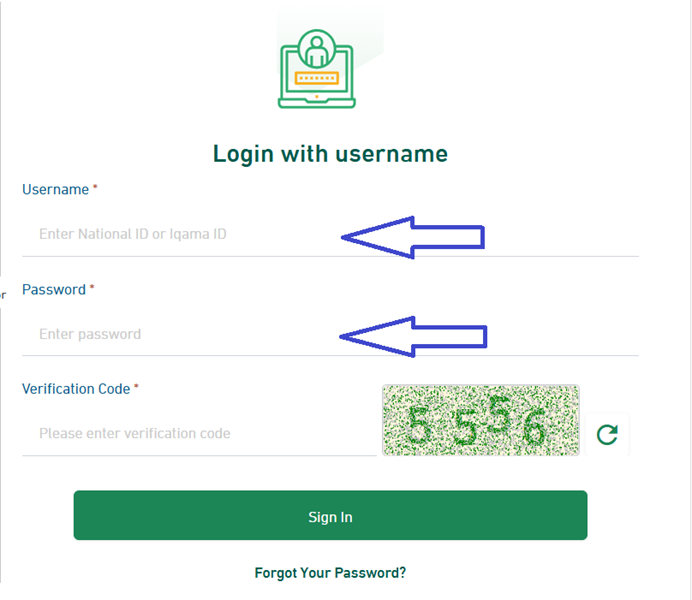
- Accept the terms and conditions.
2. Explore portal products
- Go to the products page from navigation
- View product page details by clicking on Display API to view full information
- Click on Subscribe button to subscribe to a product
- Wait for your subscription request to be approved
- Create your first application to get App keys
- Try out a product by accessing the product details page, opening Swagger documentation, and pressing Try it out.